Contributors

Sunday, 25 May 2014

Guides on Unlocking Huawei B933/B200/B200W for FREE

Guides on Unlocking Huawei B933/B200/B200W


You need a Google Account to Download the File if ask.

1.Unzip the Unlocker
2.Disable the anti_virus software
3.Open the DC-Unlocker Portable folder,run dc-unlockerclient2
Note:Win7-run as administrator


4.0pen rPE folder, run rPE
Note:Win7-run as administrator
5.Connect Huawei B-series Modem without sim via rj45 through lan card of pc
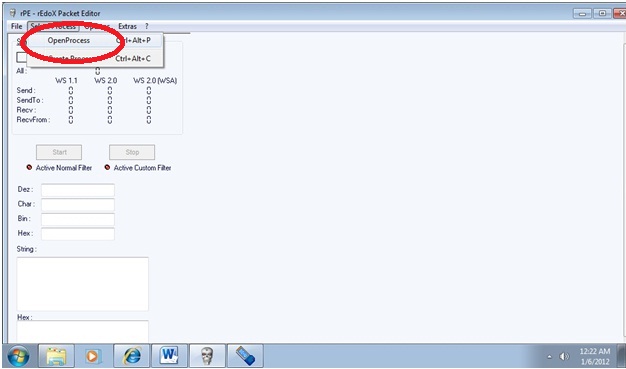
6.On rPE click Select Process>Open Process>dc-unlocker2
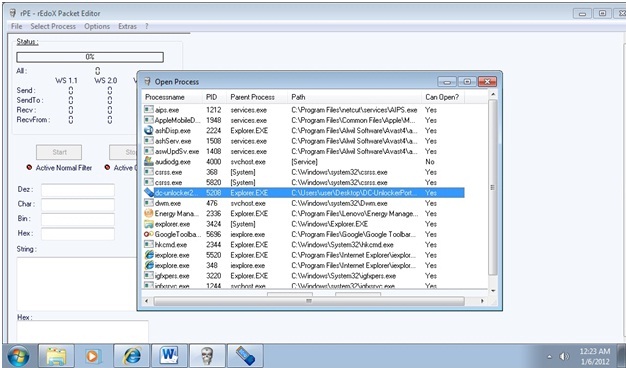


7.Click Start Tab on rPE,
8.Click the Magnifying glass tab at dc unlocker
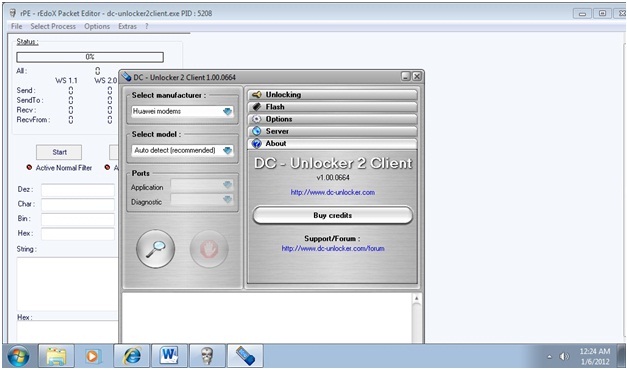


9.Go back to rPE, click Stop Tab

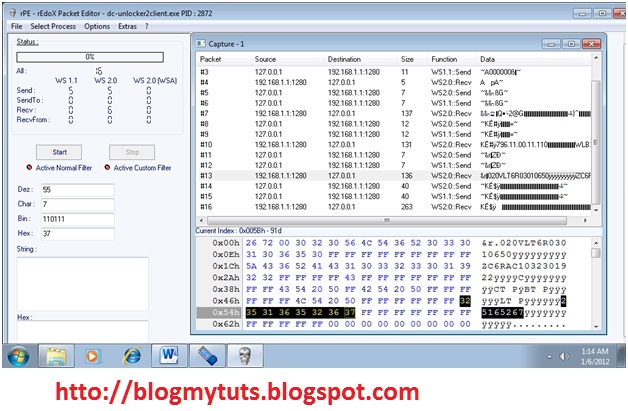
10.Click Packet 13 for B200/B200W and Packet 16 for B933 and get the 8 digit code
Ex. Unlock code for B200W:25165267



11.Open Internet explorer, 
type 192.168.1.1/en/cardlock.asp

username:admin /password:gtadmin  put the 8 digit code, then apply, unlocking is done. 'CREDIT TO SYM'


12. To access the admin setting or  how to change WiFi Password for B200w.

  Type this on your Browser  for Globe User  (on original huawei firmware admin:admin)

192.168.1.1/globe

.. it will prompt you for password..


username: admin
password: gtadmin

SIM CARD

APN LIST --> CLICK HERE


OR reffer this tuts http://blogmytuts.blogspot.com/2012/11/how-to-change-wifi-password-on-huawei.html?utm_source=feedburner&utm_medium=feed&utm_campaign=Feed%3A+Blogmytuts+%28blogmytuts%29 


 UPDATED with DC unlocker 1.0.664


Skip Ads in 5 Sec

Unlocked Huawei LTE B593 For FREE

Huawei Technologies have recently launched a new algorithm which is used to generate the unlock codes for Huawei modem, in this article you can read about the Huawei Unlock Code Algorithms.


What Is Unlock Code Algorithm ?

Unlock code algorithm is just a sequence of logical operations (or, Xor, MD5) which is done on your IMEI in order to get the Unlock Code for Huawei Modems.


Determine Which Algorithm Does Your Modem Support

Confused ? Which algorithm does your modem support? Then its now easy to determine which algorithm does your Modem Support by using our Huawei Algo Check Tool, Just Follow this steps

Go-To http://www.modemunlock.com/huawei-algo-check

Unlocked Huawei LTE B593 Free Requirements  :

  • Internet
  • Google + account
  • common sense


1.Get  Your Modem  IMEI number at the sticker (you can see this at the back of your modem )
Example: 860091022942006
be careful writing it on a notepad  double check


2. Visit    this  Site :  http://huaweicodecalculator.com/new-algo/

Click  Sign in with Google  +


 3. Input your IMEI number  and Modem Model
Sample  here..  then click calculate.


 4. You must click Google +   to continue


 5. Get your Free New Algo Code  to unlocked your modem.
NOTE: Total Unlock Code you can generate is up to 6 .


6. Plug your Modem insert a new SIM Card from different  Provider.  ( I insert Smart here and the status is locked )


7. Log in on your browser.

If you have  default config    type this IP address your browser

192.168.254.254
Username: user
Password: @l03e1t3

If you already used  config patch for admin

192.168.1.1
Username: admin
Password: password123

You can download  admin patch  at  this post :
http://blogmytuts.blogspot.com/2014/04/huawei-lte-cpe-b593-4g-router.html

8. Go to internet TAB input your unlocked code.


  9.When  unlocked  Success you can see your SIM status  is Normal. You can input your new Internet Provider APN at APN Management.


Read More About  Huawei LTE CPE  B593: 

http://blogmytuts.blogspot.com/2014/04/huawei-lte-cpe-b593-4g-router.html


Credit: http://huaweicodecalculator.com

Sunday, 13 May 2012

Official Google Mobile Blog: Galaxy Nexus now on sale in Google Play

Official Google Mobile Blog: Galaxy Nexus now on sale in Google Play: We started shipping Nexus phones more than two years ago to give you a pure Google experience and access to the latest Android updates. Toda...We started shipping Nexus phones more than two years ago to give you a pure Google experience and access to the latest Android updates. Today, we’ve started selling Galaxy Nexus (HSPA+) from a new Devices section in the Google Play web store, so you can quickly and easily purchase an unlocked version of the phone. We want to give you a place to purchase Nexus devices that work really well with your digital entertainment.

Galaxy Nexus by Samsung runs the latest Android software, Ice Cream Sandwich, with Google mobile services, Google Play and new features like Android Beam and Google+ mobile hangouts. It also offers a 4.65” HD Super AMOLED display that’s perfect for watching movies, playing games or reading books on the go.

First available in the U.S., Galaxy Nexus costs $399 and arrives at your door unlocked, without a carrier commitment or contract. You can use it on the GSM network of your choice, including T-Mobile and AT&T. It also comes pre-installed with the Google Wallet app which lets you easily make purchases and redeem offers with a tap of your phone. Best of all, we'll give you a $10 credit to get you started with your new mobile wallet.

We’ve come a long way since the first Android devices started hitting shelves three and a half years ago and since the launch of the first Nexus device. More than 300 million Android devices have been activated globally. We’ve worked with developers and content partners to launch Google Play, offering more than 500,000 apps, millions of songs and books, and thousands of movies. And we’ve implemented new customer support services to improve the purchasing experience on Google Play. We’ve taken all of this into consideration in designing Devices on Google Play. We hope to bring it to more countries soon.


By: Google

Friday, 11 May 2012

Update Globe Promo

 Load sakto 10 pesos

SUPERFB10 send to 8888 for GLOBE Subscribers. 1 day unli for mobile and USB modem

ASTIGFB10 send to 8888 for TM  Subscribers. 1 day unli for mobile and USB modem

This promo have 5mb limit sessions but good for browsing

Friday, 13 April 2012

Globe Surf Promo


This are the latest globe surf promo.

NOTE:
  • You need to have at least Php1 load in your Prepaid account to continue using the service.
  • Prepaid Subscribers must choose between TIME or MB plans when registering to POWERSURF15, 30, and 50.

Sunday, 8 April 2012

Beware Using VPN for Smart

Smart Telecoms is now Blocking all Sim using VPN, Now they blocking the SIM not only for connecting through internet and now sending text message. This is prevent to unblocked the SIM using texting to there service promo.

Thursday, 5 April 2012

Speed Guide

 The Speed of your Internet connection is dependent on the type of signal available.

Mobile Internet Connection                                                  Maximum Speed
HSPDA                                                                                  3.6 to 23mbps
3G                                                                                          384kbps
EDGE                                                                                    156kbps
GPRS                                                                                     12 to 48kbps

Maximize Your Data Charge Using Chuck2Surf

Hello!! for those who unsuccessfully unlocked (Globe) SIM, You can still reduce your data charge by your network operator.. For Example register MB15 for 20mb data use for 1 day = 1 day Unlimited MB data. Happy Browsing

Wednesday, 4 April 2012

Chicago Server

 Just now update Chicago server Free for Download
Instruction:
1. Download and Extract it with winrar
2.Copy and Paste to chuck2surf folder "Data/config"

-> Download Now

Sunday, 1 April 2012

Chuck2Surf Google Page

I would like to announce that chuck2surf has  Google Page its under maintenace.
take a sneak look. ;)
http://sites.google.com/site/chuck2surf/home

Saturday, 31 March 2012

HotSpot Shield strengthens VPN with anti-malware wall

AnchorFree, the global leader in consumer privacy and Internet freedom, today announced the addition of malware protection to its security, privacy and open Web access solution, Hotspot Shield ( http://www.hotspotshield.com ). AnchorFree's Hotspot Shield addresses a market of more than 1.5 billion users -- 600 million of whom live under censorship and another 800 million of whom use anti-virus products to secure their devices, but lack a solution to secure their browsing and Internet communications. Hotspot Shield is already the world's most popular consumer Virtual Private Network (VPN) with more than ten million monthly users and one of the most downloaded mobile security  solutions in the Apple App store. New malware protection transforms the product into a complete browser security offering, with a database of more than three million malicious domains. Malware protection will be available on all platforms with Hotspot Shield, including PC, Mac, iPhone, iPad and iPod touch.


Hotspot Shield's VPN technology encrypts a user's entire Web session -- turning all HTTP sites into HTTP(S) -- so that every website visited and every mobile app is as secure and private as a banking site. The new layer of malware protection now alerts Hotspot Shield users when they attempt to access domains containing malware, providing them with a snapshot of the page they're trying to access and blocking the malicious site. Regular updates to the malware database will ensure that Hotspot Shield users remain one step ahead of online security threats at all times.


AnchorFree CEO David Gorodyansky said during a phone call on Tuesday that the update makes HotSpot Shield a complete secure browsing solution. "There was no issue for us in integrating the secure browsing with the VPN."
When I tested it, the updated Elite version worked well. There was no lag time where the malicious site appeared to resolve before being blocked. And in fact, the way the new protections work is to prevent that site from even loading in the first place. Instead, what you're shown below the warning is a screenshot of the site.
There are two options in the upper right corner of a blocked page. The first takes you to a little-known search engine called Search-Results.com, that appears to have a referral deal with Anchor Free. While that makes sense from a business perspective, a link to the browser's default search engine would've been more polite. Search-results.com is also known for paying companies that install proprietary toolbars to have them change your default search engine. That's not happening here, thankfully.
Below that is a link to go to the real site, though for obvious safety reasons AnchorFree doesn't recommend you click on it. I perceived no lag in loading either known malicious sites or known safe ones.

How To Enable Chuck2Surf VPN Sharing

If you want to share your VPN you must update your driver.
If you  look at your network connection you can't find this Anchorfree HSS Adapter

Download the  Driver Here
Instruction:Open the Remove Tap after remove click the Install Tap

Friday, 23 March 2012

How to Unlocked G Sim

 You can View the Step how to Unlocked  Sim here..
1. We need a SIM for G* Old or New SIM CARD.
2. TXT 222 for a balance Check or to Activate your New SIM.
3.Now check the validity of your SIM.

 Name:
Number: 222
Content:
Your balance as of 01/07/2012 17:31 is P1.00 valid til 02/21/2012 19:41 w/ 35 FREE txts. Pls note that system time may vary from the time on ur phone.
Time: 07/01/2012 17:31:18
4.If your Sim is NOT valid LOAD 50php.
5.Now REG any Power Surf  Promo ( MB15, POWERSURF50 ) I prepared MB15 the cheapest.DON'T CONNECT YOUR DASHBOARD YET!
6.Connect your VPN with a working CONFIG (lport and remote port
7.Connect your broadband dashboard, and BROWSE if can Congrats!!
8.NO BROWSE? means its not unlocked Succesfull...STOP YOUR SUBSCRIPTION.
EX:
FOR MB15 TXT " PSURFMB STOP send to 8888"

Try and try mo :P
Tips: Don't do it at night 8888 is bz. 
 
NOTE: Connect VPN first before you Broadband
 Facts:
Why we need to load and subcribs to their promo?
Ans: G* have a pocket data monitoring system so. by doing this.. there are few fragments left in your pocket  data Record.


Why we need to Load?

Ans: By reloading the validity of the SIM is extended. Load 50 and shared it to your mobile sim to prevent Load eaten by your internet provider

Sunday, 30 October 2011

FREE INTERNET ALL OVER THE WORLD (Chuck2Surf )

 Welcome to Chuck2Surf your FREE VPN
  A portable VPN Manually Config,


OpenVPN is a full-featured SSL VPN which implements OSI layer 2 or 3 secure network extension using the industry standard SSL/TLS protocol, supports flexible client authentication methods based on certificates, smart cards, and/or username/password credentials, and allows user or group-specific access control policies using firewall rules applied to the VPN virtual interface. OpenVPN is not a web application proxy and does not operate through a web browser.
OpenVPN 2.0 expands on the capabilities of OpenVPN 1.x by offering a scalable client/server mode, allowing multiple clients to connect to a single OpenVPN server process over a single TCP or UDP port.
This document provides step-by-step instructions for configuring an OpenVPN 2.0 client/server VPN, including:
Click this for more info
Using a Free VPN is the best idea if your answer is ‘Yes’ for any of the question below.
  • Do you have problems in opening certain websites like LinkedIn and Twitter at work?
  • Has your school blocked social networking sites like Facebook and Myspace?
  • Do you require to work anonymously online?
  • Secure web browsing ?
  • Used Free Internet without Paying Prepaid Broadband?
  • n I used it for my mobile 3g phone for FREE Internet?
 

Some FAQs
Why do I see ads?
~Hotspot Shield is a free, ad-supported product. In order to provide users with a free service, we show advertisement from our partners. Once you disconnect from Expat Shield, you will no longer see advertisement from our partners.
Use Adblock to prevent Ads for better browsing
For chrome
https://chrome.google.com/webstore/d...amgkkbiglidom#
For Firefox
https://addons.mozilla.org/en-US/fir.../adblock-plus/
For Internet Explorer version IE7, IE8 and IE9
http://simple-adblock.com/
For Safari
http://safariadblock.com/
For Opera
https://addons.opera.com/addons/exte...-adblock/0.46/


Does HotSpotShield have bandwidth limit?
~No. You can use HotSpot Shield as much as you would like.

What is Anchorfree HSS adapter Network card(Tap-HSS Adapter)?
~It is a virtual -- as opposed to hardware, NIC (Network Interface Controller) which is installed along with Hotspot Shield. It is used to facilitate access to Anchorfree's VPN (Virtual Private Network). HotSpotShield can be used to circumvent the geographical restrictions applied to some websites, such as http://www.hulu.com
Source(s):
http://hotspotshield.com/
http://en.wikipedia.org/wiki/Network_interface_card
http://en.wikipedia.org/wiki/Vpn

How to Install HotSpot Portable?

*You  need HSS Tap Driver

TAP HSS 32bit Adapter.rar Download
TAP HSS 64bit Adapter.rar Download
 
*Download the Portable VPN
 Download Portable 

New Portable Fixed Download 

How to download my File?


*Install the Tapdriver
*Run the Portable VPN as for Window7 and Vista you must run it with Administrator to run it properly.
Sample Speed

*Choose a server and connect and you may now enjoy your VPN and FREE Internet Anywhere.


Your can Donate and have more FREE VPN SERVER to select when  1 server is crowded
15 server 50$
30 server 100$
This are life time FREE VPN and Internet .

Other Blog click Here

Like us on Facebook  leave a comment for any problem or suggestions. 

Get paid to share your links!